Skip to content
FESCO Bill Check by CNIC: Is It Possible in 2026?
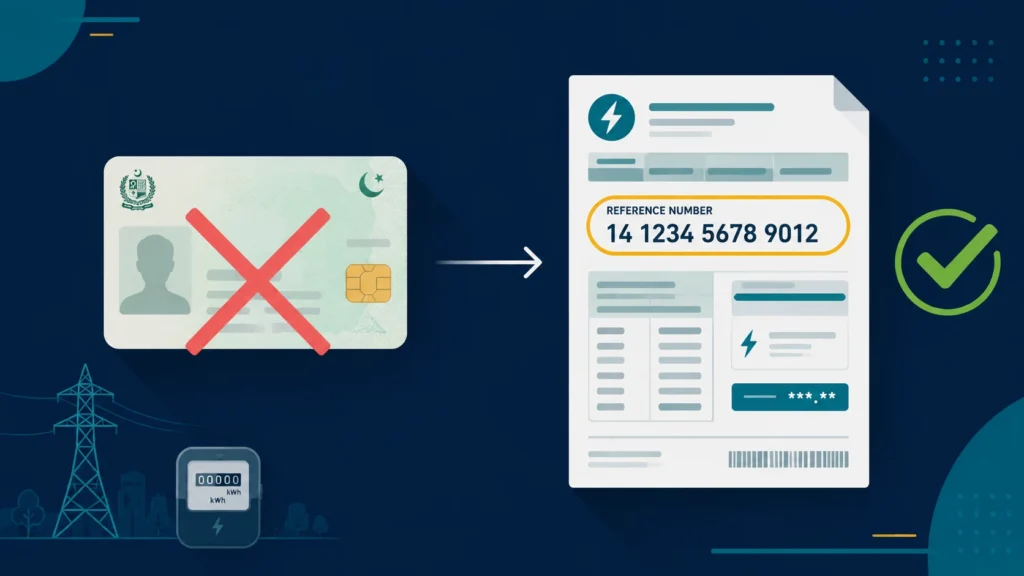
No—the live public PITC FESCO bill interface does not currently offer direct CNIC lookup. Its visible search options are Reference No and Customer ID. Use the 10-digit Customer ID guide or learn how to locate the 14-digit reference number. Independent information website; not an official FESCO or PITC service.
Why can’t you check a FESCO bill with a CNIC?
FESCO bills are stored against a connection, not against a person.
When a meter is installed, the connection gets its own identifiers: a reference number, a customer ID, and a meter number. The billing database, which is maintained by PITC (Pakistan Information Technology Company) for FESCO and the other DISCOs, indexes bills by those connection identifiers. Your CNIC may sit in the account application paperwork, but it is not the key the billing system searches on.
There are three practical reasons this has not changed:
- One CNIC can hold many connections. A single person may own a house, a shop, and a tube well. A CNIC search would return several accounts with no clean way to tell them apart on a public page.
- Many connections are not in the current occupant’s name. Tenants, inherited properties, and connections still registered to a previous owner are extremely common in Faisalabad, Jhang, Sargodha and the rest of the FESCO region. A CNIC search would fail for most renters.
- Privacy. A public CNIC-to-bill lookup would let anyone pull up a stranger’s address, usage and payment history using an identity number that is widely visible on other documents.
So the reference number is not red tape. It is the only identifier that maps to exactly one connection.
What you actually need: the 14-digit reference number
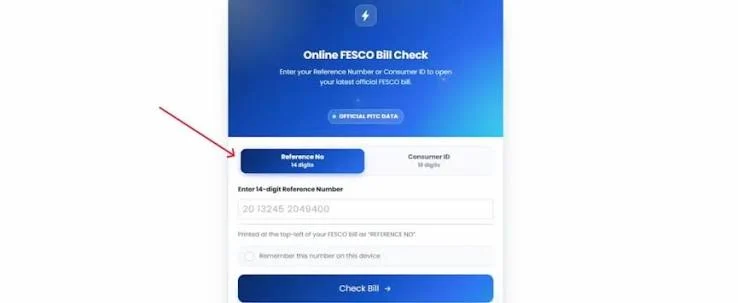
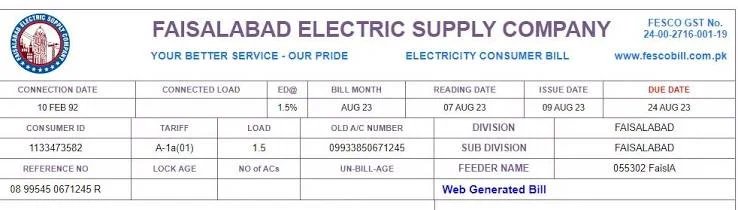
Your reference number is printed on the upper-left area of every FESCO bill, paper or PDF, labelled “Reference No.” It is 14 digits long. Use the number printed on your latest bill; if it is rejected or appears different, try the Customer ID or contact FESCO for confirmation.
Enter it with no spaces and no hyphens. The lookup is an exact match, so one missing digit returns nothing at all rather than a “close” result.
Reference number vs customer ID
Both numbers sit on the same bill and people mix them up constantly. This single confusion causes a large share of failed bill searches.
| Reference number | Customer ID / Consumer ID | |
|---|---|---|
| Length | 14 digits | 10 digits |
| Printed as | “Reference No.” | “Customer ID” or “Consumer ID” |
| Used for | Online bill check, duplicate bill download, bill payment | Account-level matters at the FESCO office |
| Recommended source | Latest available bill | Latest available bill |
Some tools accept either one. But if a form specifically asks for the reference number, do not paste the customer ID in that field. It will fail every time, and it will look like the system is down when it is not.
How to find your reference number without a CNIC
If you have any old bill, you already have it. If you do not, work through these in order.
1. Check any previous bill, paper or PDF. Start with the number on your latest available bill. If an older number is rejected, try the Customer ID or contact FESCO.
2. Check the connection or meter paperwork. The demand notice, the connection application, and the meter installation documents usually carry the same reference number.
3. Check your WhatsApp, email or SMS. If you ever registered for FESCO’s e-bill service, or if a shopkeeper or bank once sent you a screenshot of the bill, the number is in there.
4. Ask a neighbour on the same feeder. This does not give you your number, but the first digits of a reference number encode the sub-division and feeder. It helps the office locate your account faster.
5. Visit your FESCO sub-division office. Take your CNIC, the property address, and the meter number if you can read it off the meter body. Staff can look the connection up against the address, the meter number, or the owner’s name and hand you the reference number. This is the one place where your CNIC genuinely helps, because a human is doing the search, not a public form.
Can you check a FESCO bill with a meter number?
Not through the online bill-check tools. The meter number is useful at the sub-division office, and it is what the meter reader records, but the public bill lookup does not index by it. Same answer for name, address and phone number.
The practical takeaway is that the live public PITC FESCO interface currently offers Reference No and Customer ID. Offline, the office can search on almost anything.
What about “FESCO bill check by CNIC” websites?
You will see these in search results. Treat them with caution.
Some are simply mislabelled. The page title says CNIC because that is what people search for, but the form on the page still asks for a reference number. That is harmless keyword bait.
Others are a real problem. If a page asks you to enter your CNIC and then shows a bill, ask yourself where that data came from, because FESCO’s system did not provide it. Never enter your CNIC together with your mobile number, date of birth or a payment detail on a page you do not recognise. A bill check should never require any of that.
The honest test is simple: an accurate bill-checking tool should use an identifier visibly supported by the current public interface: Reference No or Customer ID.
How to check your FESCO bill online, step by step
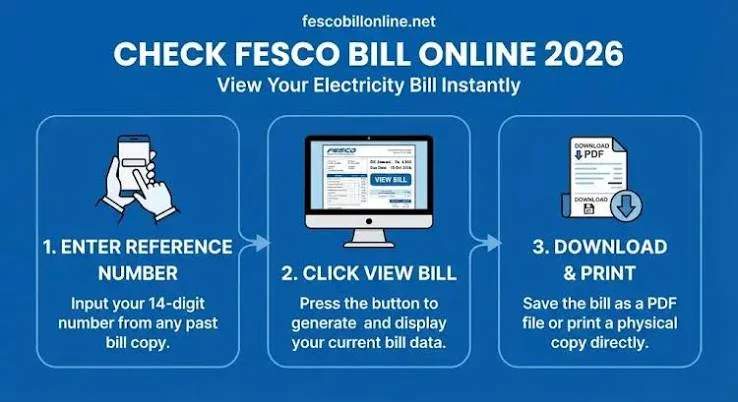
- Find your 14-digit reference number on any previous bill.
- Open a bill-checking tool such as FESCO Bill Check.
- Enter all 14 digits with no spaces or hyphens.
- Select Check Bill.
- Your current bill loads with the payable amount, due date, billing month and units consumed.
- Use the download option to save the duplicate bill as a PDF for payment or printing.
A brand-new connection can take one or two billing cycles before it appears online. That is normal and is not a fault in the tool.
FESCO bill not found: what to check
Work through this in order instead of retrying the same input.
- Recount the digits. Exactly 14, no spaces and no hyphens.
- Confirm you used the reference number and not the customer ID.
- Check whether it is a new connection that has not been billed yet.
- Try again after a short wait, since the billing system is occasionally down.
- Still stuck? Visit your sub-division office with an old bill or the connection paperwork.
Full troubleshooting steps are on the bill not found section of our main guide.
Where FESCO operates
FESCO, the Faisalabad Electric Supply Company, supplies electricity across eight districts of central and northern Punjab, split into two divisions:
- Faisalabad Division: Faisalabad, Jhang, Toba Tek Singh, Chiniot
- Sargodha Division: Sargodha, Mianwali, Khushab, Bhakkar
If your bill is not appearing under FESCO and you are outside these districts, check the company name printed on your paper bill. You may be served by a different DISCO such as MEPCO, LESCO or GEPCO, in which case you need that company’s bill-checking tool instead.
Need help from FESCO directly?
| Channel | Number |
|---|---|
| Helpline (outages and urgent issues) | 118 |
| Toll-free UAN (billing and account queries) | 0800-66554 |
| Faisalabad regional office | 041-9220184 |
Complaints run through CCMS, the Customer Complaint Management System operated by PITC. Keep your reference number ready when you call, and note down the complaint or DMR ID you are given, since that is how you track status and escalate later. If an issue is not resolved through FESCO’s own process within a reasonable time, it can be escalated to NEPRA, the sector regulator, through its official consumer complaint system.
Frequently asked questions
Can I check my FESCO bill using my CNIC? No. FESCO’s billing records are indexed by connection, not by person. You need the 14-digit reference number, or on some tools the 10-digit customer ID.
Is there any way to get my reference number using my CNIC? Yes, but only in person. A FESCO sub-division office can look up your connection against your CNIC, the property address, or the meter number and give you the reference number. There is no online equivalent.
Can I check a FESCO bill with a meter number? Not online. The meter number helps at the sub-division office, but the public bill-check tools do not search on it.
Is checking a FESCO bill online free? Yes. Checking and downloading your bill costs nothing, on FESCO’s own channels or on an accurate third-party tool.
Can I view previous months’ bills, not just the current one? Yes. The regenerated bill usually includes a bill-history section covering recent months alongside the current bill.
Is the downloaded PDF accepted for payment? Yes. The duplicate copy is accepted at banks, ATMs and payment counters the same way as the original paper bill. Download the PDF before printing rather than printing from the on-screen preview, because previews sometimes cut off the barcode.
Ready to check? Enter your 14-digit reference number on the FESCO Bill Check tool and your current bill, due date and downloadable copy load in seconds.
Disclaimer: FESCOCheckBill.com.pk is an independent, informational guide and is not affiliated with, endorsed by, or operated by the Faisalabad Electric Supply Company (FESCO) or PITC. All bill data displayed comes directly from FESCO’s official billing records. This site does not generate, alter, or process payments.
{
“@context”: “https://schema.org”,
“@type”: “FAQPage”,
“mainEntity”: [
{
“@type”: “Question”,
“name”: “Can I check my FESCO bill using my CNIC?”,
“acceptedAnswer”: {
“@type”: “Answer”,
“text”: “No. FESCO’s billing records are indexed by connection, not by person. You need the 14-digit reference number, or on some tools the 10-digit customer ID.”
}
},
{
“@type”: “Question”,
“name”: “Is there any way to get my reference number using my CNIC?”,
“acceptedAnswer”: {
“@type”: “Answer”,
“text”: “Yes, but only in person. A FESCO sub-division office can look up your connection against your CNIC, the property address, or the meter number and give you the reference number. There is no online equivalent.”
}
},
{
“@type”: “Question”,
“name”: “Can I check a FESCO bill with a meter number?”,
“acceptedAnswer”: {
“@type”: “Answer”,
“text”: “Not online. The meter number helps at the sub-division office, but the public bill-check tools do not search on it.”
}
},
{
“@type”: “Question”,
“name”: “Is checking a FESCO bill online free?”,
“acceptedAnswer”: {
“@type”: “Answer”,
“text”: “Yes. Checking and downloading your bill costs nothing, on FESCO’s own channels or on an accurate third-party tool.”
}
},
{
“@type”: “Question”,
“name”: “Is the downloaded PDF accepted for payment?”,
“acceptedAnswer”: {
“@type”: “Answer”,
“text”: “Yes. The duplicate copy is accepted at banks, ATMs and payment counters the same way as the original paper bill.”
}
}
]
}
Check your FESCO bill in seconds
Enter your 14-digit reference number and your current bill, due date and downloadable copy load right away.
Disclaimer: FESCOCheckBill.com.pk is an independent, informational guide and is not affiliated with, endorsed by, or operated by the Faisalabad Electric Supply Company (FESCO) or PITC. All bill data displayed comes directly from FESCO's official billing records. This site does not generate, alter, or process payments.