Skip to content
FESCO Online Bill Check Previous Month: The Complete 2026 Guide
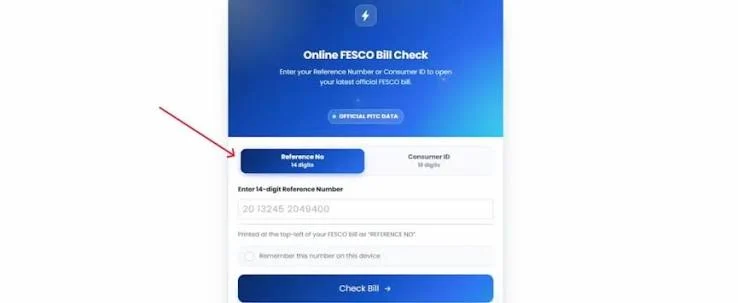
The public FESCO bill interface opens the latest available bill rather than letting you select any month. If the rendered bill includes billing-history information, use it to review earlier amounts and consumption. Start with the homepage bill checker; use the FESCO bill download guide to save an available copy. Independent information website; not an official FESCO or PITC service.
What “Previous Month” Really Means on the FESCO Portal
When you search using your 14-digit Reference Number or 10-digit Customer ID, the system returns your latest generated bill — not a specific month you choose from a dropdown. There is no month selector where you type “March” or “August” and get that exact invoice.
After the latest bill opens, review any billing-history section shown in that rendered record. The available range and level of detail can vary, so this is not the same as requesting a standalone duplicate bill for a chosen older month.
This distinction matters because a lot of consumers search for their exact February or June bill expecting a full duplicate copy, and instead find only a one-line summary in the history table. Both are useful — they just answer different questions.
What You Need Before You Start
Two identifiers work on FESCO’s billing system, and either one is enough on its own.
14-Digit Reference Number
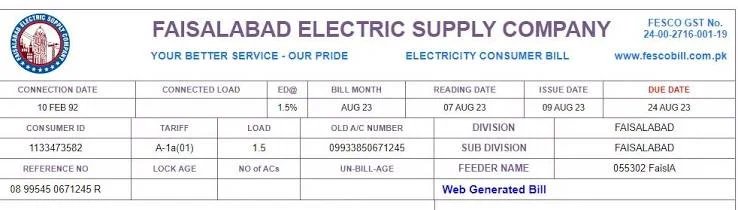
The reference number printed on your bill identifies the connection for online bill services and is normally reused when checking later bills. Use the number shown on your latest bill. If it is rejected or appears different, try the Customer ID or contact FESCO for confirmation.
10-Digit Customer ID
The 10-digit Customer ID appears in the consumer details area of the bill and is offered by the current public PITC interface as an alternative search option. Use the ID shown on a recent bill.
Don’t have either handy? Look at an old bill, a bank payment receipt (many show the reference number), or call FESCO’s 118 helpline with your connection address.
Step-by-Step: FESCO Online Bill Check Previous Month
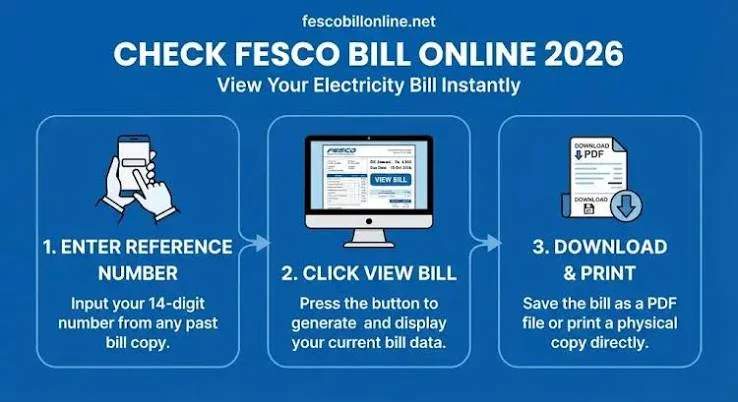
- Open the FESCO bill checking page.
- Select whether you’re entering a Reference Number or a Customer ID.
- Type the number exactly as printed — no spaces, no dashes.
- Submit the form and let the current bill load.
- If the rendered bill includes a history or previous-bills section, open that section.
- Look for the billing period you need within the information currently displayed.
The history view may show summary details such as units and billed amount; it may not provide a full standalone copy for every older period.
How to Read the FESCO Bill History Table
The history table is compact, but each column answers a specific question:
- Billing month — which cycle the row belongs to
- Units consumed — how much electricity you used that month
- Billed amount — the total charged for that cycle
- Payment status — whether it shows as paid, unpaid, or still pending
Comparing two or three rows side by side is usually enough to explain a sudden jump in your bill — a spike in units points to consumption, while a similar unit count with a higher amount usually points to tax or surcharge changes instead.
If the Needed Bill Is Not Available Online
The public interface does not provide a month selector or guarantee a downloadable copy for every older billing period. Check copies you previously saved, review payment history from your bank or wallet, or contact FESCO and ask what account records can be provided.
Reading Your Previous FESCO Bill: What Each Section Means
Once a bill is open — current or from the history table — a few line items confuse people more than the rest:
- FPA (Fuel Price Adjustment) — a variable charge that moves up or down with fuel costs, separate from your base electricity rate.
- GST — the standard sales tax applied to the bill amount.
- PTV fee — a fixed Rs. 35 government charge that cannot be removed or waived.
- Meter rent — a small fixed monthly charge for the meter itself.
- Late Payment Surcharge — added only if the previous cycle’s bill was paid after its due date.
- Un-bill-age — shown when a previous month’s bill was skipped or missed, indicating how many months remain unpaid.
Reading these line by line, rather than just checking the total, is usually what explains why one month’s bill is noticeably higher than the last, even when consumption looks similar.
Why the Previous Month’s Bill Actually Matters
Beyond simple curiosity, there are a few practical reasons people go looking for an older FESCO bill:
- As address or utility proof for a rent agreement, visa application, or bank account opening
- To compare consumption before and after buying an air conditioner, motor, or other high-load appliance
- For subsidy or relief scheme applications that ask for a recent bill copy
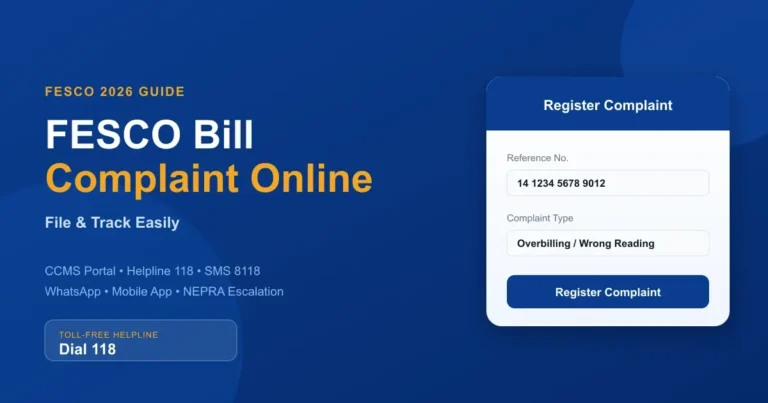
- To dispute a charge, by showing the meter reading and units from the month before
- For personal or business tax and expense records
FESCO Bill Check Without a Reference Number
If your printed bill is gone and you do not have the reference number, use the 10-digit Customer ID shown on a recent bill; the live public PITC interface offers it as an alternative search option. FESCO’s official duplicate bill system does not currently support searching by CNIC or mobile number — despite this being a common search, no such option exists on the portal. If both your Reference Number and Customer ID are lost, an in-person visit to your local FESCO office with your CNIC and connection address is the only reliable fallback.
How to Check If Your Previous FESCO Bill Was Paid
Open the bill history table described above. Alongside the amount for each month, it shows a paid or unpaid status. Keep in mind this reflects payments that have already been recorded in FESCO’s billing system — a payment made in the last day or two may not appear immediately. For same-day confirmation, check your bank or mobile wallet app’s transaction history instead, and keep that receipt as backup proof regardless of what the portal shows.
Common Problems and How to Fix Them
Bill not found
Almost always a mistyped digit. Recheck the number against a physical bill character by character before trying again.
History table is empty or incomplete
New connections or recently updated accounts may show limited history. Review what the rendered bill provides and contact FESCO if a required period is missing.
Portal is slow or not loading
FESCO’s billing data is pulled from a shared government billing system (PITC) that all consumers use at once, so it can slow down around the 1st of the month when bills are generated. Try again after a short wait.
Amount on the portal doesn’t match your memory
Compare the units consumed rather than just the total — taxes and the FPA component change monthly even when your usage doesn’t.
Official Portal vs. Third-Party Websites
Several independent websites also offer FESCO bill checking by pulling the same data from the official billing system. These can be convenient, but a few precautions are worth keeping in mind:
- Never enter your CNIC, banking password, or card PIN on a bill-checking page — a basic bill lookup never needs that information.
- Stick to sites that only ask for the Reference Number or Customer ID.
- Treat unrealistic claims (instant refunds, prize offers, subsidy “approvals”) on a bill page as a red flag.
- For actual payment, use your bank’s app or a recognised wallet service rather than a random bill-checking site.
FESCO Bill Payment Methods
Once you’ve confirmed the amount and due date, payment can be made through:
- Mobile and internet banking apps
- JazzCash and Easypaisa
- Bank branches and ATMs
- 1-Link and Raast
- Pakistan Post and NADRA e-Sahulat centres
For app-based payment, select Electricity, choose FESCO from the list of DISCOs, enter the Reference Number, confirm the amount displayed matches your bill, and complete the transaction. Save the confirmation message or receipt.
FESCO Coverage Area
FESCO — Faisalabad Electric Supply Company — supplies electricity across Faisalabad, Sargodha, Jhang, Toba Tek Singh, Chiniot, Bhakkar, Khushab, and Mianwali. Consumers in any of these districts use the same Reference Number or Customer ID system to check and pay their bills online.
Frequently Asked Questions
Can I check my FESCO bill from two or three months ago?
The latest rendered bill may include recent billing-history information, but the range and detail shown can vary. The public search form does not let you choose a month directly.
How far back does FESCO’s online bill history go?
The public interface does not state a guaranteed history period on its search form. Review the history shown after opening the bill, or contact FESCO if the needed period is absent.
Can I check my FESCO bill using my CNIC?
No. FESCO’s duplicate bill portal only accepts the Reference Number or Customer ID; CNIC search is not available for bill lookup.
Why does my previous month’s bill show as unpaid even though I paid it?
There can be a short delay before a payment is reflected in the billing system, especially if it was made close to month-end. Keep your payment receipt as proof in the meantime.
Is checking my FESCO bill online free?
Yes, checking and viewing your bill through the official portal or any legitimate FESCO bill-checking website is free of charge.
Final Thoughts
A previous-month check starts by opening the latest available bill and reviewing any history displayed with it. The portal does not offer a direct month selector, so contact FESCO when the needed period is not available online. Keep your Reference Number or Customer ID saved somewhere accessible, and checking your bill each month becomes a two-minute habit rather than something you have to figure out from scratch every time
Check your FESCO bill in seconds
Enter your 14-digit reference number and your current bill, due date and downloadable copy load right away.
Disclaimer: FESCOCheckBill.com.pk is an independent, informational guide and is not affiliated with, endorsed by, or operated by the Faisalabad Electric Supply Company (FESCO) or PITC. All bill data displayed comes directly from FESCO's official billing records. This site does not generate, alter, or process payments.