Skip to content
FESCO Online Bill Check Print: A Complete Guide

To print a FESCO duplicate bill correctly, open the available bill, choose Print in your browser, select A4 paper and portrait orientation, then disable unnecessary browser headers and footers. If you need another copy first, use the duplicate FESCO bill guide; to save a file instead, follow the PDF download guide. Independent information website; not an official FESCO or PITC service.
What Is FESCO
FESCO, short for Faisalabad Electric Supply Company, is the distribution company responsible for supplying electricity across central Punjab. If your meter falls under this network, your monthly bill is a FESCO bill, and the fastest way to view it is through the FESCO online bill portal.
Areas Covered by FESCO
FESCO’s service area is wider than just Faisalabad city. It includes:
- Faisalabad
- Jhang
- Toba Tek Singh
- Chiniot
- Sargodha
- Khushab
- Mianwali
- Bhakkar
Confirming your district helps you make sure you are checking the right company, since Pakistan has several regional electricity boards.
What You Need Before You Start
Keep one of these ready before opening the bill portal:
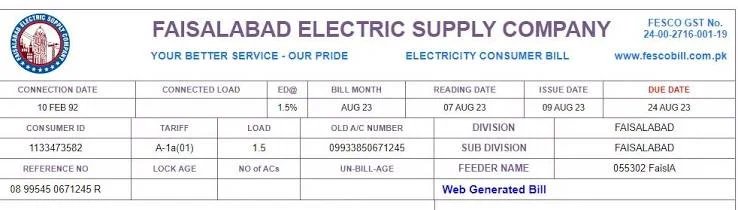
- Your 14 digit reference number, printed at the top of your last bill
- Your 10-digit Customer ID
The reference number is the quickest route since it pulls your exact account directly.
How to Check FESCO Bill Online, Step by Step
- Open a browser such as Chrome or Safari on your phone or computer.
- Go to the official FESCO billing portal or a trusted duplicate bill checking website.
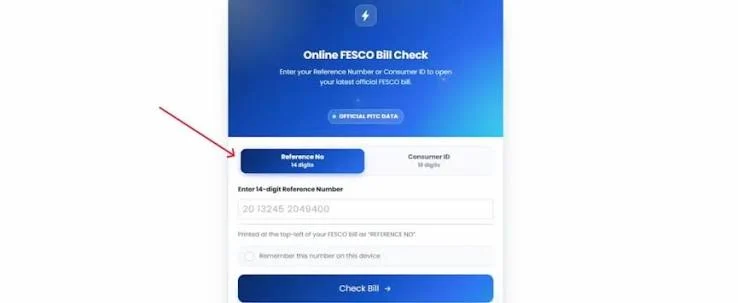
- Find the bill search box on the homepage.
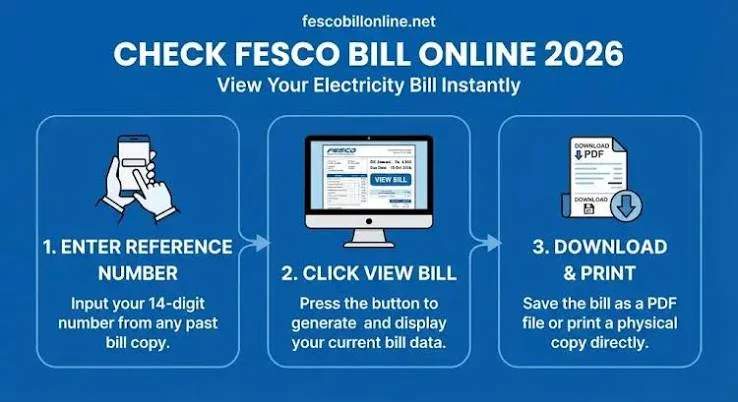
- Enter your 14 digit reference number, or your customer number instead.
- Click the search or check button.
- Wait a few seconds while the system fetches your latest bill.
- Your bill will appear on screen with your name, address, meter reading, units consumed, amount payable and due date.
If your reference number does not work, check that you typed all 14 digits without spaces or dashes, since one wrong digit returns no result.
How to Print Your FESCO Bill
Once the bill loads on screen:
- Click the print icon or print button on the bill page.
- Set the paper size to A4 for a properly aligned copy.
- Choose portrait orientation, since FESCO bills are formatted vertically.
- Remove any browser generated header or footer text before printing.
- Click print, and your duplicate copy is ready for payment or record keeping.
How to Download Your FESCO Bill as PDF
If you would rather save a digital copy first:
- Choose the download or save option on the bill page.
- Select Save as PDF instead of a physical printer in your browser’s print settings.
- Save the file to your device.
This is handy for tenants, business owners or families who want to keep a record without printing every month.
Understanding Your FESCO Bill
Your bill contains more than just the amount due. Key sections include:
- Reference number: The 14 digit code used to locate your bill online.
- Customer number: Your permanent account identity with FESCO.
- Meter reading: Current and previous readings that determine your usage.
- Units consumed: The difference between the two readings, in kilowatt hours.
- Tariff category: Domestic, commercial, industrial or agricultural, which affects your rate.
- Taxes and duties: General sales tax, electricity duty and other government charges.
- Due date: The last date to pay without a late payment surcharge.
- Arrears: Any unpaid balance carried forward from an earlier bill.
Checking these sections carefully helps you catch errors early, such as a wrong meter reading or incorrect tariff.
FESCO SMS Service for Meter Reading
FESCO lets consumers receive their meter reading by SMS every month. Open the messaging app on your phone, type your 14 digit reference number or 10 digit customer number, and send it to 118 or 8118. Once registered, you get an SMS with your reading shortly after each cycle without needing to check the website.
How to Check if Your FESCO Bill Is Paid
After paying, confirm the payment was recorded by:
- Checking through your mobile banking app, entering your reference number to see payment status.
- Checking through JazzCash or Easypaisa, both of which show paid or unpaid status.
- Calling the FESCO helpline and asking a representative to confirm using your customer number.
Ways to Pay Your FESCO Bill Online
Common digital payment options include mobile wallets such as JazzCash and Easypaisa, internet and mobile banking apps from major commercial banks, ATM bill payment, 1Link supported gateways, and over the counter payment at bank branches and authorized franchises. Each only needs your reference number or customer ID to pull up the amount due.
Applying for a New FESCO Connection
For a brand new connection rather than an existing bill, FESCO also processes applications online. The general steps are filling in your personal details and address, uploading property documents and an attested CNIC copy, uploading a neighbor’s bill as an address reference, submitting a wiring test report, and paying the demand notice fee once generated. You can track your application status anytime using the application number you receive after submission.
How to File a Complaint with FESCO
For billing disputes, faulty meters or service interruptions, FESCO accepts complaints through its online complaint portal and through phone lines. Complaints are usually addressed within a set number of days, though calling the helpline at 118 or 8118 gets a faster response for urgent issues like line faults.
Common Mistakes to Avoid
- Typing the reference number with spaces or dashes, which most systems reject
- Using an old reference number after a meter change
- Confusing your FESCO account with a bill from a different distribution company
- Printing without setting A4 and portrait, which distorts the layout
Frequently Asked Questions
Can I check my bill without the reference number? The live public PITC FESCO interface offers Reference No and Customer ID. It does not currently show a CNIC search field.
Is checking the bill online free? Yes, viewing, downloading and printing a duplicate bill costs nothing.
How often is the online bill updated? Once each billing cycle, usually a few days after the meter reading is recorded.
Can I see previous months’ bills online? Some portals show only the current bill, while others keep a short history, so this depends on the service you use.
Final Thoughts
Checking, printing and downloading your FESCO bill online saves time, avoids queues, and gives you a permanent digital record. Keep your reference number handy each month, subscribe to the SMS meter reading service for extra convenience, and always confirm your payment status after paying so everything stays correctly recorded on FESCO’s system.
Check your FESCO bill in seconds
Enter your 14-digit reference number and your current bill, due date and downloadable copy load right away.
Disclaimer: FESCOCheckBill.com.pk is an independent, informational guide and is not affiliated with, endorsed by, or operated by the Faisalabad Electric Supply Company (FESCO) or PITC. All bill data displayed comes directly from FESCO's official billing records. This site does not generate, alter, or process payments.